
RSVP tracking that builds your guest list effortlessly
Share one link · guests RSVP themselves. Plus-ones, dietary needs, messages, payments, and check-in · all in one dashboard.
No accounts · no app downloads · just one link your guests open and respond.
The 9-in-10 RSVP problem nobody talks about
Of the RSVPs that come through Invyt, 93.9% say yes. That's not a flattering selection bias · that's just what happens when you send a digital invite to people who care about you.
Which means the problem with RSVP tracking was never the response rate. It was knowing who hadn't responded yet, and what to do about it.
Most hosts learn this the hard way. You build a spreadsheet. You message people one by one. You send polite reminders. You message again. You give up on the silent ones and guess. You over-cater. You under-cater. You walk into your own event partially blind.
The reframe is simple, and it changes everything: stop building the guest list before you send the invite. Start with an Invyt link, share it where your people already are, and let the guest list build itself as they respond. The 6.1% who tap not going still tell you something useful · you stop counting them. The ones who go quiet stay countable, because their absence shows up on the dashboard the same way their presence would.
That's what RSVP tracking means in 2026: not a form, not a spreadsheet, not a guess. A live picture of your event, updating itself in real time, while you do something else.
One link goes everywhere your guests already are
Here's the moment most other RSVP tools fall over. You have an event. You have a tool. The tool wants your guest list. Your guest list lives in seven places · your phone contacts, an old Facebook event, the family WhatsApp group, your work calendar, an email thread from when you booked the venue, your partner's Instagram followers, and a notepad on your fridge. You don't have a list. You have a network.
Invyt doesn't ask for the list. It gives you a link.
You drop the link in the family WhatsApp group on Sunday morning. By Tuesday, 12 people have RSVP'd · including your cousin's new partner whose number you don't have. By Friday, you know exactly who's coming, who's bringing someone, who's vegetarian, who left a message saying their kid's school play moved, and who's still mulling. You did nothing in between.
The link works on every device. Every chat app. Every email client. Every browser. No app to download for you · no app to download for them. No accounts required. No friction between "I got the invite" and "I tapped going."
Drop it in a group chat. Post it to Instagram. Text it. Stick a QR code on the venue door for late additions. The link is the guest list.
The one dashboard that runs the whole event
This is the section that earns the page its rank.
Most RSVP tools are RSVP tools. Invyt isn't. Invyt is the only platform where the same dashboard that shows your RSVPs also runs your invitations, your wedding website, your payment collection, your check-in scanner, and your post-event memory book. The breadth is the moat · because the breadth is what hosts actually need.
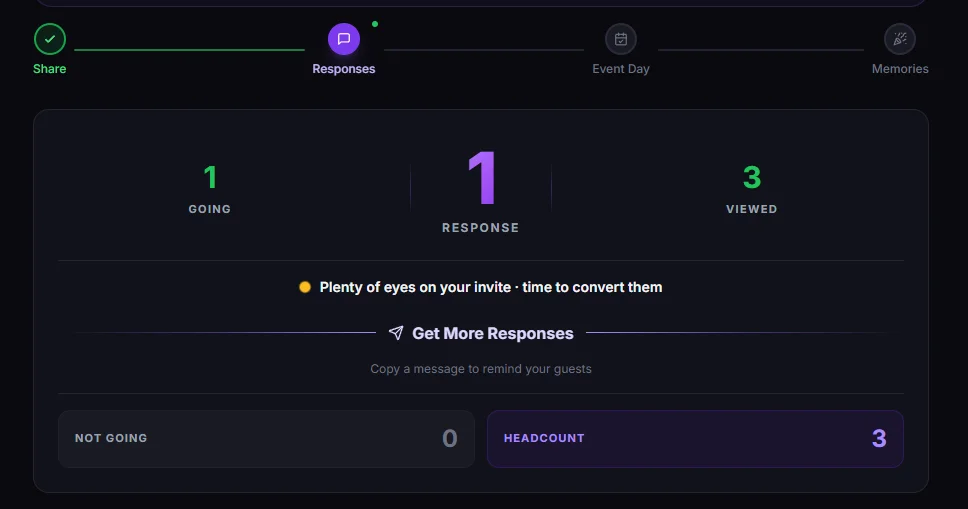
Real-time RSVPs · the live picture
Every response lands on your dashboard the moment a guest taps it. Name, status, plus-ones (with names attached · 40.7% of "going" guests bring at least one), dietary requirements, and any personal message they leave. 42.3% of guests leave a message. That number stops being a stat the first time you read a heartfelt note from a friend who can't make it. Invyt surfaces those messages alongside the headcount so you don't lose them in admin.
Premium card designs · the same dashboard
Hundreds of premium designs across weddings, birthdays, baby showers, parties, and bespoke events · with uploaded photos, atmosphere effects, and font controls on custom cards. The card is the invitation; the invitation is the link; the link is the RSVP page. You don't pick a tool for the card and a different tool for the responses. You pick a card, and the responses route to the same dashboard where the card lives.
Invyts · the single-page invitation format
Invyt's premium single-page invitation experience · animated card reveal, lush typography, the kind of design that makes guests screenshot the invite. Built into the same workflow. Same dashboard. The aesthetic you'd expect from Paperless Post; the response data you'd expect from a CRM.
Wedding websites that live through your big day
If you're a couple, the dashboard adds a third dimension. Your wedding website transforms across three stages. Before the wedding, guests browse your story, view the schedule, and RSVP. On the day, it becomes a live photo wall where everyone shares moments in real time. After, it evolves into a digital memory book where guests leave messages as keepsakes. One website. Three stages. Every guest interaction logged in the same dashboard you used to track the RSVPs.
Payments · RSVPs · check-in · one workflow
Selling tickets? Collecting contributions? Accepting gifts via Stripe? Guests pay as they respond, you see every transaction tracked next to their RSVP. On the day, open the check-in scanner on your phone and scan QR codes at the door · the same dashboard that knew they were coming now knows they're here. The tools that usually need three separate apps live in one tab.
Memory book and photo wall · post-event, no setup
After the event, guests can leave a personal keepsake · a photo and a message preserved as a page in your digital memory book. They open the link they already had. They contribute. You download the book as a PDF. Nothing to set up. Nothing to migrate. The dashboard runs the after-party too.
The 5 things every RSVP tracker must do in 2026
Use this list to evaluate any tool, including ours. If a tool fails on any of these, it doesn't deserve to handle the event you've already paid a venue for.
1 · Capture plus-ones with names attached
40.7% of "going" RSVPs on Invyt include at least one plus-one · two of every five yeses bring an extra person. A tool that lets a guest tap +2 without telling you the names is a tool that hands your caterer a guess. Invyt collects each plus-one's name at the same moment the RSVP comes in. No follow-up message required. No name-search the morning of.
2 · Handle dietary requirements honestly
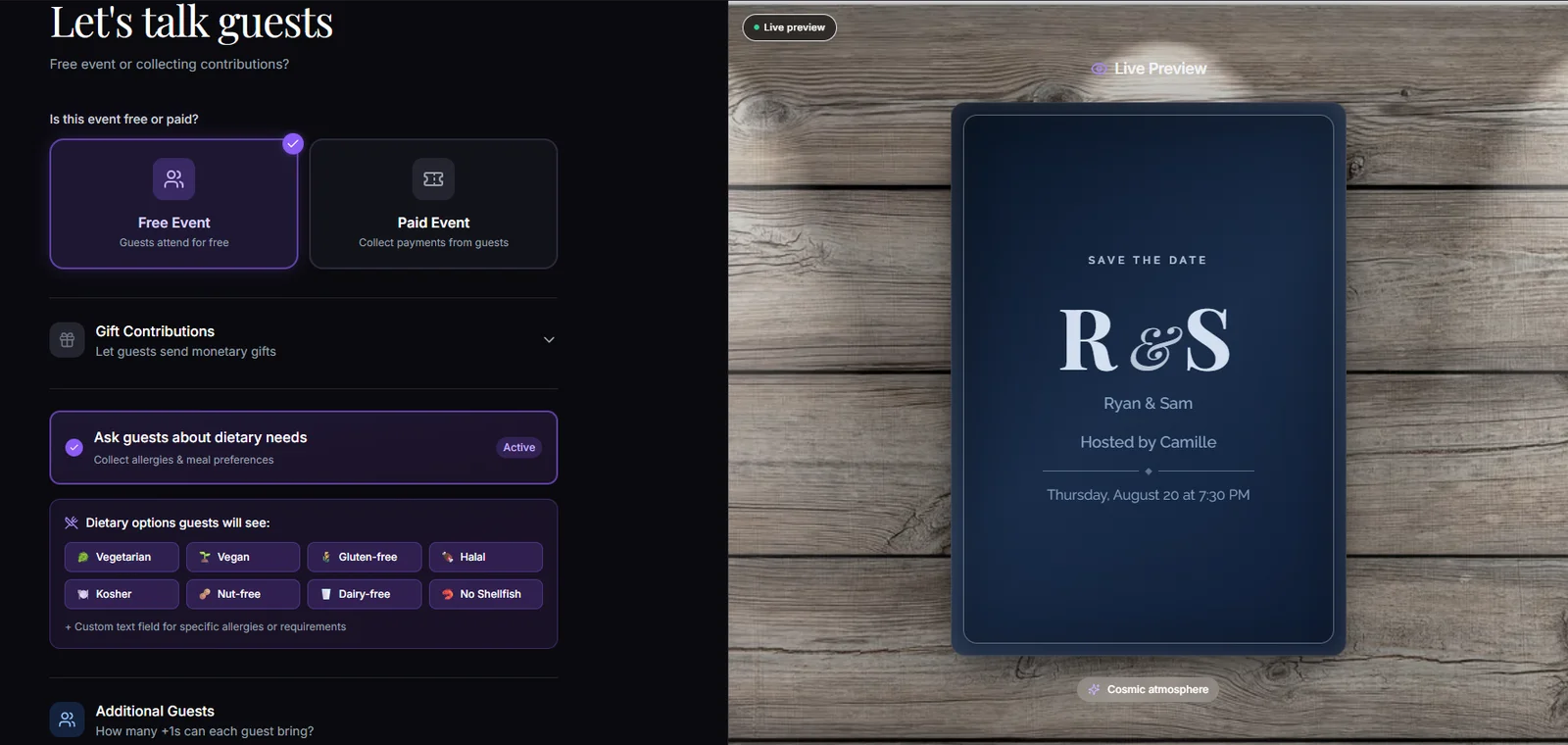
5.4% of "going" guests on Invyt submit dietary requirements. Small percentage. Life-or-death detail. A guest with a peanut allergy who tells you they can't have peanuts and gets peanuts is a story the caterer will hear about for years. Every serious RSVP tool needs to (a) prompt the question, (b) surface the answers prominently, and (c) let you export them as a clean list. Invyt does all three from one click.
3 · Surface guest messages, not bury them
42.3% of guests leave a message · the highest engagement signal we measure. Forms tools bury the message field at the bottom of the response page. Invyt promotes it to the same row as the RSVP itself, because the message is often where the most useful information lives ("we'll be there but Sarah is on crutches" · "running 20 minutes late but yes" · "can we bring our dog?"). If your tool treats the message as an afterthought, you'll miss things that change how the event runs.
4 · Send updates without rebuilding the list
Plans change. Venues flood. Babysitters cancel. You need to message every guest who said yes · ideally in two taps, ideally from the same dashboard you used to track their RSVPs. Invyt's broadcast updates land via email and push notification to every confirmed guest with a single click. No new list. No copy-paste between apps. Updates are part of the workflow, not a separate thing to remember.
5 · Work on mobile · because that's where your guests are
The top five hours for RSVPs on Invyt (in UTC) are 17:00, 16:00, 21:00, 19:00, and 14:00 · midday through evening in Europe; commute and lunch-break hours globally. People RSVP from phones, on the train, between meetings, before bed. Every screen of an RSVP flow needs to load fast and feel instant on a phone. If it doesn't, you'll lose RSVPs to the user-interface equivalent of dropped calls.
Wedding RSVPs · the slightly different rules that apply
Weddings are about a quarter of Invyt's volume · 25.4% of events on the platform. Couples planning a 150-person wedding have a different set of RSVP problems than someone hosting a casual party, and the tooling should reflect that.
Plus-ones for weddings come with a name attached, always. "Sarah +1" is a problem on a place card and a problem in a seating chart. Invyt requires the plus-one's full name when the guest is allowed one · 40.7% of our going-RSVPs bring at least one person, and at wedding scale that's potentially 60+ names you'd have to chase by hand. The dashboard collects them all at RSVP time.
Dietary requirements scale into mission-critical territory at 150-person weddings. 5.4% of guests submit dietary needs across all event types · which in absolute terms means for a 150-person wedding, roughly 8 guests will have specific dietary requirements. Eight is the difference between a happy reception and a kitchen disaster. The dietary export from Invyt's dashboard is a single PDF you hand directly to the caterer · no spreadsheet retyping, no missed allergies.
The RSVP timing math · why your deadline is probably too late →
The three-stage wedding website is the wedding-specific moat. A standard RSVP tool gives you a yes/no response page. Invyt's wedding website transforms across three stages of the day · before the wedding, guests browse your story, view the schedule, find directions, and RSVP. On the day, it becomes a live photo wall where guests share photos in real time as the night unfolds. After, it evolves into a digital memory book where guests leave personal messages alongside their photos, preserved as a downloadable keepsake. One link, three stages, every interaction logged in the same dashboard. No separate RSVP tool plus separate wedding website plus separate photo-sharing tool · the integration is the product.
Invyt vs the other RSVP tools · the honest comparison
We won't pretend Invyt is the only good option. The right tool depends on the event you're running. Here's the honest breakdown · pricing verified 2026-05-13 against each competitor's live pricing page where publicly disclosed.
| Best at | Honest weakness | ||
|---|---|---|---|
| Invyt | One link, one dashboard, every host-side workflow under one tab · invitations, RSVPs, wedding website, payments, check-in, memory book | Less of a household name than Evite · less premium-printed than Paperless Post | See pricing |
| RSVPify | Robust event-registration software with strong tiered guest workflows | Branded heavily around "event registration" · pricing scales aggressively with guest count | Free up to 100 invitees per event · Starter from $24/mo · Professional from $409/mo for 1,500 registrations · Ticketed events 1.95% + $0.90 per ticket |
| Evite | Massive brand recognition · most US guests have used it before | Ad-supported free interface · feels cluttered for premium events | Free with ads · Evite Pro $249.99/year (unlimited Premium invitations, up to 2,500 guests per event) |
| Paperless Post | Best-in-class premium card aesthetic · the closest to "stationery on a screen" | Coins pricing stacks up unpredictably · feature breadth lower than Invyt | Coins $0.14-$0.48 each (bulk discount) · ~2-6 Coins per recipient depending on design · Paperless Pro $250/year for 250 guests |
| The Knot | Free wedding-website builder · vendor marketplace integration | Wedding-only · everything else out of scope · monetizes via vendor referrals not tool quality | Free, monetized via vendor partnerships |
| Punchbowl | Animated card formats · long-running brand with family-event focus | UI dated compared to newer cohort · feature set narrower than Invyt | Pricing not publicly disclosed on website at time of writing |
| Jotform | Form-builder power · 40+ payment integrations, deep enterprise features | Not designed for events · feels like filling out an HR form for a party | Free Starter (5 forms · 100 monthly submissions) · Bronze $34/mo annual ($39/mo monthly) · Silver $39/mo annual · Gold $99/mo annual |
| Partiful | Mobile-first vibe for casual gatherings · text-blast invites | Light on dietary/plus-one/payment workflows · designed for tonight, not for the wedding in six months | Free · no paid tier as of May 2026 |
| Greetings Island | Generous free tier · 700K+ events created | Functional but utilitarian · design library is broad but not premium | Pricing page not publicly accessible at time of writing |
Invyt
RSVPify
Evite
Paperless Post
The Knot
Punchbowl
Jotform
Partiful
Greetings Island
Our honest pitch: if you're hosting a casual house party tomorrow, Partiful's faster. If you want a printed-paper aesthetic, Paperless Post is the benchmark. If you want a free wedding website with no expectation of features beyond a guest list, The Knot does that.
If you're hosting an event that you'll remember in five years · a wedding, a milestone birthday, a baby shower, a corporate dinner that actually matters · and you want one tool to handle invitations, RSVPs, payments, the wedding website, the check-in, and the memory book without ever copy-pasting between apps · that's the question this product answers.
How to set up RSVP tracking on Invyt in 60 seconds
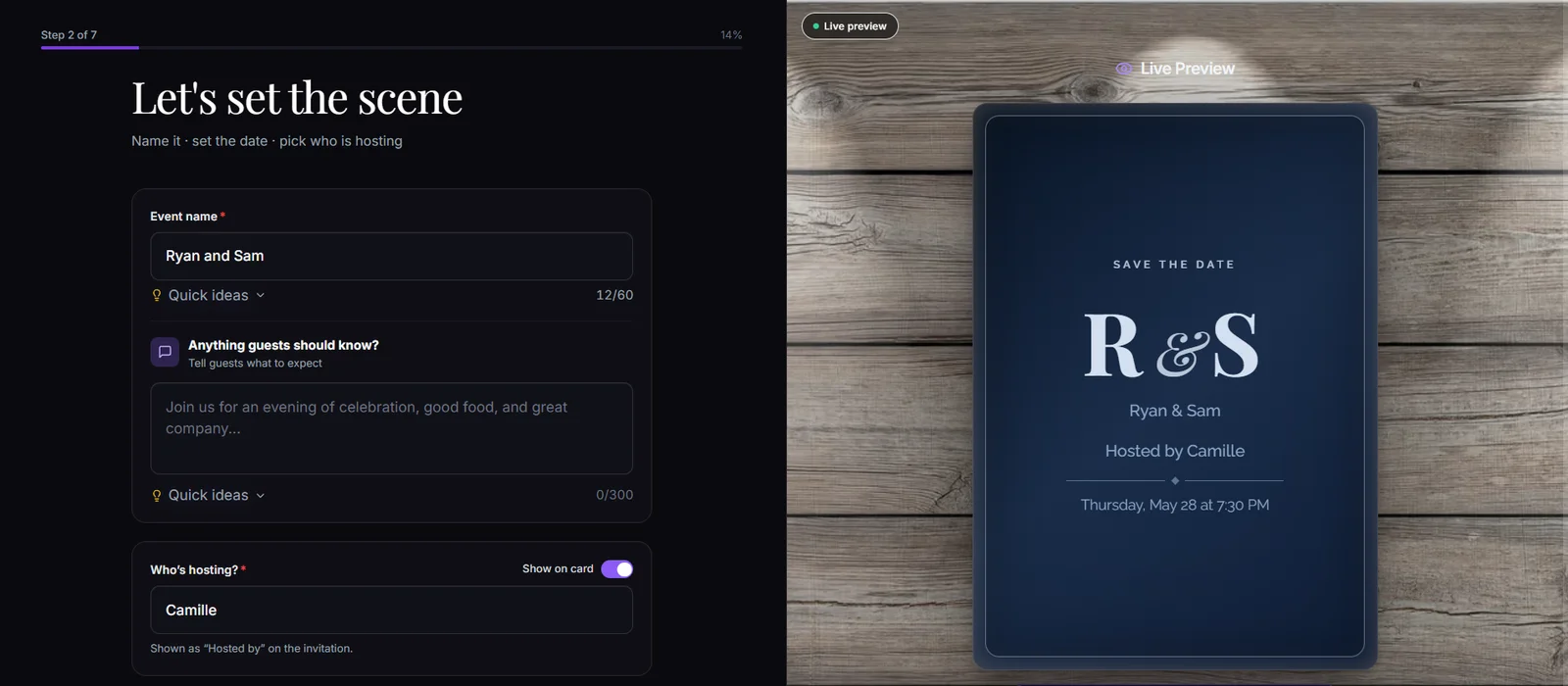
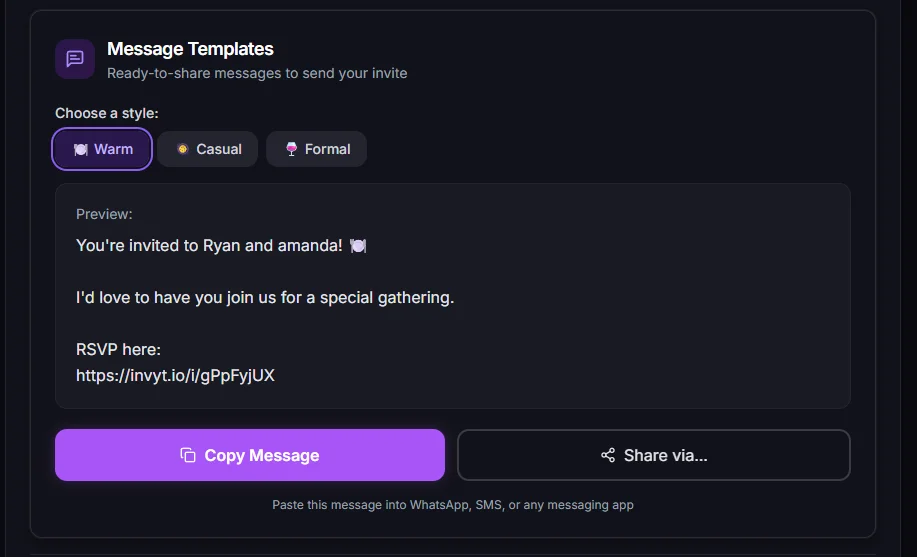
The four steps from cold-open to live-dashboard. Median first-time host completes step 1-3 in about a minute on Invyt.
Edge cases · the questions hosts ask after they pick a tool
What does a guest need to RSVP?
Just an email address. No account, no app download, no password · they open your link, type their name and email, and tap going. The email is what lets them edit their own response later, receive your broadcast updates, and get a confirmation. The link itself can travel anywhere · WhatsApp, SMS, Messenger, group chats, Instagram, in-person QR scan · but every guest signs their RSVP with an email so the response is theirs to come back to.
Can I limit plus-ones?
Yes · set a maximum number of plus-ones per RSVP for the event (0, 1, 2, or more). The limit applies across all guests so the rule stays consistent. If you need finer-grained control for a specific situation · for example a wedding where one named partner is allowed but other guests aren't · handle it through your invite copy and follow up directly if needed. The dashboard shows you exactly who said they're bringing whom.
What happens if someone tries to RSVP twice?
Invyt checks for an existing RSVP at the same email. If one exists, the second attempt is blocked with a friendly message telling the guest they've already responded · no duplicate row in your dashboard. To change their response, the guest opens the same invite link again on any device · their existing RSVP loads and they can update name, status, plus-ones, dietary needs, or message in place. The change shows up on your dashboard in seconds.
How do I handle last-minute changes?
Two ways. For one guest · they tap their invite link again and update their own RSVP · the change is reflected in your dashboard within seconds. For everyone · send a broadcast update from your dashboard. One click, one email, one push notification, every confirmed guest informed. No group chat chaos.
Can I export the guest list for my caterer?
Yes. Download as CSV. The export includes name, RSVP status, plus-ones with names, dietary requirements, and the column you actually need most · headcount · already totaled. Hand it to your caterer, your venue, or anyone who needs it. No spreadsheet engineering required.
Is RSVP data private?
Yes. Guests RSVP only for themselves · they can't see other guests' responses unless you choose to make the guest list public (most don't). RSVP data travels over HTTPS end to end. Invyt doesn't sell data, doesn't share it with third parties beyond what's strictly required to run the platform (e.g., Stripe for payments), and lets you delete an event and all its data with one click from your account settings.
What if I'm using a wedding website?
Your wedding website is the RSVP page. Same link · richer surface. Guests browse your story, see the schedule, find directions, and RSVP without bouncing between sites. The dashboard you track responses in is the same one that runs the photo wall on the day and the memory book afterwards.
RSVP tracking by event type
The same one-link, one-dashboard workflow runs every event type. The specifics differ slightly · so do the design libraries.
Wedding invitations
25.4% of Invyt events. Three-stage wedding website, named plus-ones, meal-choice tracking. The deepest configuration set on the platform.
Birthday invitations
27% of Invyt events · the largest category. Casual to milestone. Plus-ones, dietary, optional gift collection.
Baby shower invitations
Co-host workflow for gift coordination. Gender-reveal-friendly designs. Dietary export for catering.
Party invitations
10.5% of Invyt events. Lightweight RSVP collection · share via WhatsApp, group chat, SMS, Instagram.
Engagement invitations
Premium card designs that double as save-the-date. Wedding-website upgrade path.
Anniversary invitations
Milestone celebrations · co-host for a partner-organised surprise.
Corporate event invitations
2.1% of Invyt events. Co-hosts for team coordination, dietary export, payment collection for ticketed events.
Dinner party invitations
3.2% of Invyt events. Intimate scale · dietary tracking is the star feature.
Frequently asked questions
What does RSVP stand for?
Répondez s'il vous plaît · French for "please respond." It made its way into English invitations in the late 1800s and has been the polite shorthand for a yes-or-no reply ever since. Today it usually shows up at the bottom of an event invite next to a deadline.
Is online RSVP tracking accurate?
Yes · more so than paper or email-thread tracking, because nothing relies on a human reading and tallying replies. Every response is timestamped, deduplicated, and attached to a name. Invyt's dashboard reflects the current state of the guest list every time you refresh it, in real time as new responses come in.
Do my guests need to download an app?
No. Invyt is browser-based · guests open the link on whatever device they have (phone, tablet, computer) and respond. No app store. No account creation required for guests. The host doesn't need an app either · the dashboard works in any browser.
Can I track RSVPs without sending email invites?
Yes. Most Invyt invitations are shared via WhatsApp, group chats, SMS, or Instagram · the link is what matters, not the channel. You can send the same link by email if you want · we make it easy · but you don't have to.
What's the difference between an RSVP tracker and a guest list manager?
A guest list manager asks you to build the list first, then track who's coming. An RSVP tracker (the Invyt approach) lets the guest list build itself as people respond. The output is the same · a list of who's coming · but the work involved is dramatically different. With Invyt, you skip the build step entirely.
How does Invyt's RSVP tracker compare to Evite's?
Evite's strength is brand recognition · most US guests have RSVP'd to an Evite at least once. Evite's weakness is that the interface is ad-supported and the feature set hasn't moved much in the last decade. Invyt is cleaner, more modern, and folds invitations + RSVPs + payments + wedding websites + check-in into one dashboard. The honest swap point: if you want familiarity, Evite. If you want premium design and one tool that handles everything, Invyt.
What does Invyt include besides RSVP tracking?
Premium card designs across weddings, birthdays, baby showers, parties, and bespoke events; single-page Invyt invitations with animated reveals, three-stage wedding websites (before / day-of / after), Stripe-backed payment collection, QR-code check-in, broadcast updates, dietary export, memory book, and the photo wall. All on one dashboard. One link drives every interaction.
Can I use Invyt for a corporate event?
Yes. Corporate events represent about 2.1% of Invyt events today · smaller than birthdays (27%) or weddings (25.4%), but the workflow is identical: pick a card, share a link, collect responses, run check-in. Multi-host events support co-hosts, which matters for team-organized work events.
What if my event has fewer than 10 guests?
The same workflow scales down. The smallest events on Invyt are intimate dinners (3.2% of events). One link, however few people open it, with the same dashboard underneath. No "you must have N guests" minimum.
What if my event has 200+ guests?
Invyt's dashboard handles event size from a six-person dinner to a 200+ person wedding without changing how it works · the same one-link share, the same one-dashboard view. Hosts on the platform routinely run events in that range.
Your event deserves better than a group chat and a spreadsheet
Premium designs · one link · every RSVP, plus-one, dietary need, and message in one dashboard. The way serious hosts run their event.